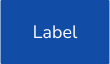
Buttons are clickable elements that are used to trigger actions. They communicate calls to action to the user and allow users to interact with the pages in various ways. The label of the buttons expresses what action will occur when the user interacts with them.
Buttons
Preview
Uses
A screen can contain more than one button. We must show a single high emphasis button (primary button), which may be accompanied by other lower emphasis buttons (secondary or neutral) that perform less important actions. The emphasis level of a button helps determine its appearance.
When to use
When not to use
Behaviour
Types of buttons by use

Primary

Secondary

Tertiary

Neutral
Types of buttons by size

S

M

L
XL
Types of buttons by content

Text

Icon + Text

Text + Icon

Icon
Types of buttons by state

Active

Hover

Focus

Pressed

Disabled
States for chatbot button

Default

Hover

Focus

Pressed

Disabled
Accessibility
This component has been validated to meet the accessibility requirements of UNE-EN 301549:2022, which includes the criteria of WCAG 2.1 (AA), however, changes in content and styles can affect accessibility compliance. We must make sure to review and follow the guidelines in this section when you update or add new content or style to this component.